Master SKUs are a simple way to connect your Source Inventory and your Channel Listings to your Product Catalog. Within Flxpoint, the Master SKU is a unique, primary identifier. Each variant will have its own Master SKU.
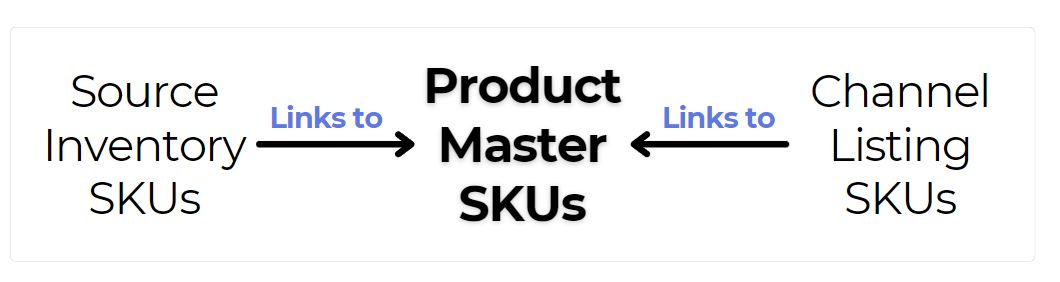
The Master SKU can be used to connect and merge inventory data from your sales channel(s) and multiple sources. For more information on connecting Master SKU to your sales channel(s) and source(s), please see:
- Master SKU & Channel Listings
- Master SKU & Source Inventory
Master SKU & Product Catalog


Master SKU Prefix for Pre-Built Sources
During onboarding, you can configure a master SKU prefix that applies to all of your pre-built source integrations. The prefix is added to the front of the SKUs Flxpoint generates as each pre-built source imports its inventory, keeping your SKUs consistent and easy to recognize across every supplier you connect.
Where it's set: The master SKU prefix is configured in the onboarding flow, in the step where you connect your pre-built source integrations. Set it before your sources finish importing — the prefix shapes SKUs as inventory is brought in, so confirming it early keeps every source consistent from the start.
What it applies to: The prefix applies to your pre-built source integrations — the suppliers Flxpoint connects to out of the box. Every pre-built source you add during onboarding uses the same prefix as its inventory is imported.
How it works: As Flxpoint imports inventory from a pre-built source, the prefix is placed at the front of each generated SKU, so your SKUs stay uniform as inventory is synchronized across sources. For example, if a supplier's product comes in with the SKU 12345 and your master SKU prefix is ACME-, the SKU Flxpoint generates is ACME-12345.
Tips:
- Keep the prefix short and recognizable so it reads cleanly in front of each supplier's SKU.
- Plan your prefix before connecting your sources — choosing it up front avoids having to reconcile SKUs that were imported under different naming later on.
- The prefixed SKU becomes the identifier that flows through your inventory and order processes, making products easier to find, map, and route once supplier inventory and orders are moving through Flxpoint.
- Want to change the prefix later? Reach out to Flxpoint support first, since the prefix shapes SKUs that are already in use across your inventory and orders.